
Dialogic: A Tool to Facilitate Discussion



Introduction
The 2024 vice presidential debate felt off-kilter to my students. In my “Election Watch” elective class—yes, I suppose I am a masochist for teaching that in this political climate—students commented that they had never seen such a cordial debate. In fact, a few students seemed disappointed at the lack of verbal jabs and witless comebacks that have become our political discourse.
The inability to discuss is not just evident in politics. Nearly every major talk show broadcasts a host speaking over oppositional guests or lobbing loaded, ill-intentioned questions to those with differing viewpoints. Sports shows similarly seem to have embraced an open-argument format to capture viewership. Even my Thanksgiving dinners, and likely many of my students’, sometimes look the same way.
Students are inundated with the message: discussions are about winning. Our classrooms may be the only place that students learn how to discuss—how to be in a space of shared thought in which different viewpoints are explored for understanding, not winning. I view my classroom as the refuge that, hopefully, could demonstrate to students that the fiery debates they see on social media do not represent the way we should be discussing ideas or confronting oppositional viewpoints.
I want students to see what discussions should look like. Students need to practice articulating their thoughts with a group, actively listening to others’ perspectives, inviting differing opinions, monitoring themselves to avoid dominating the discussion while still appropriately contributing, and maintaining an inviting tone and body language. Rarely do students see these skills modelled or demonstrated, and it is extremely important that they learn them in our classes in order to take those skills with them into the world.
But discussion is hard. And since students have only seen argumentative debates, they need coaching to do it right.
But discussion is hard. And since students have only seen argumentative debates, they need coaching to do it right. But coaching is also hard. After appropriately scaffolding through small group discussions, showing videos of model discussions, and clarifying expectations, educators need to somehow engage in the class discussion while tracking students participation in the discussion, while noting what students are saying, while capturing meta-discussion pointers, while…I think you get the point.
For much of my career, I have tried to find a way to manage these tasks and help students improve their discussion skills. In 2018, after only teaching for two years, I had heard about the Harkness method —a pedagogical strategy originated at Phillips Exeter Academy in New Hampshire, which centers every class around student discussion. In 2018, I attended their Exeter Humanities Institute —a week-long professional learning experience that trains teachers in Harkness pedagogy. The experience was incredibly impactful; the instructors demonstrated how to ease students into the routine of student-run discussions. In fact, it inspired me to create a 40-page guide for educators attempting to incorporate Harkness pedagogy into their classrooms.
The Problem
While the Exeter Humanities Institute provided me with some scaffolding activities to help students practice and build their discussion skills, it has been difficult finding ways to manage whole group discussions while ensuring students are growing both as a group and individually as listeners and discussants. In the past, I had tried scrawling endless notes in my legal pad and drawing a circle that attempted to track the conversation in indecipherable scribbles (Figure 1).
Figure 1
Attempts at Tracking Student Discussion
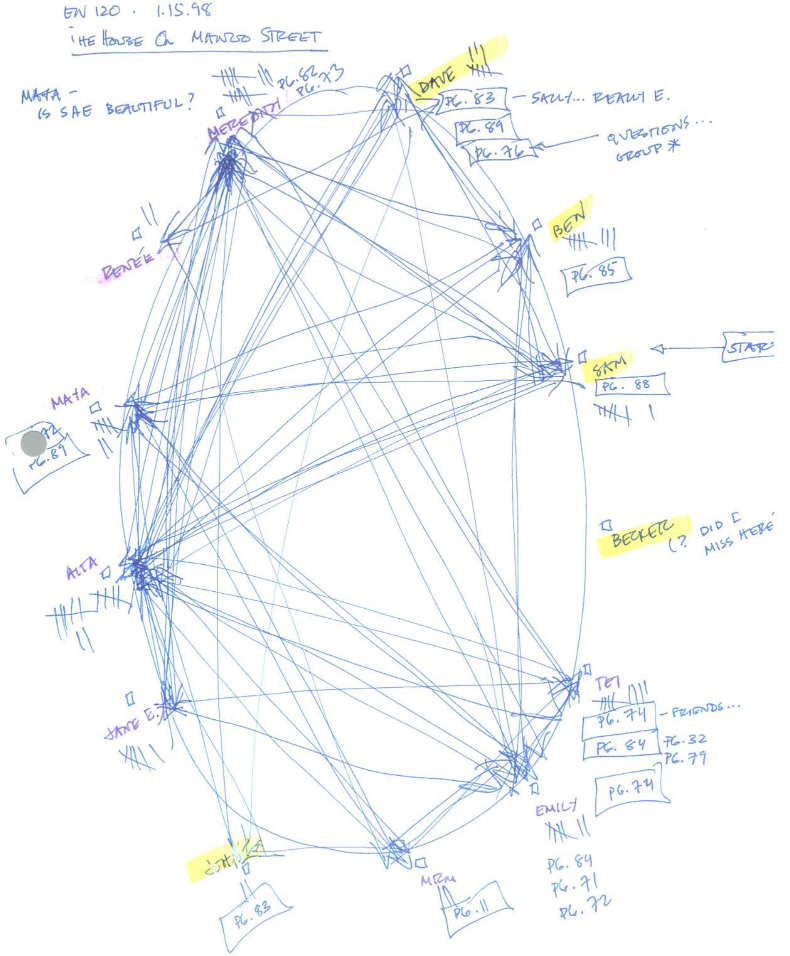
Note: Lines represent the flow of conversation and shorthand notes track the type of comment made by each student.
For many years, the scribbles have been my tracking method. However, after realizing that I could barely read my own notes, spilling coffee on one conversation map, and generally being frustrated at the process, I looked for an alternative. That is when I found Dialogic (Mishrikey, 2025).
The Solution
Dialogic is a powerful tool I now use to manage student discussions1. It allows teachers to input each class’s students, ascribe demographic identifiers if wanted, track student discussions, host their notes on the discussion, track the type of comments students make, and provide feedback for students, all with a few movements of the mouse or keyboard. It has proved much better than my legal pad scribbles. My aim in this article is to explain the what, why, and how of using Dialogic to improve the quality of student discussions, students’ self-awareness of air time, and ultimately, students’ ability to listen actively and with empathy to people with whom they may disagree.
To ensure I could communicate every detail of this tool accurately, I reached out to Josh Mishrikey, the creator of Dialogic. Josh is a former high school history teacher who developed Dialogic for his dissertation at Teachers College, Columbia University. Josh also attended the Exeter Humanities Institute two years prior to me, and was inspired to create Dialogic after the COVID-19 pandemic moved schools to online instruction in early 2020. Without the opportunity for in-class discussions, Josh set out to create a tool that could facilitate student discussions over Zoom. To do so, he “reached out to teachers to learn about their classroom dynamics and what they needed to run effective discussions,” which led to the creation of Dialogic (J. Mishrikey, personal communication, October 3, 2024).
Dialogic has become much more than a Zoom conversation tracker. As described by Josh, Dialogic now aims to “simplify diagramming, annotating types of comments (like questions, text references, or affirming someone by name), and note-taking—all at the same time—without the taxing effort of writing it all down. It centralizes all of this information in one place for teachers to review and use.” To illustrate its uses, let me showcase how I have implemented it in my own classroom.
Dialogic Workflow
Below is a screenshot of Dialogic in action. An educator creates a class and adds their students to it. Then, those students are graphically depicted in a circle on the screen. All the teacher has to do is click the name of the student who is speaking as the conversation occurs, and the tool will track the conversation. On the right side of the user’s screen is a “notes” area, where an educator can track the nature of the comment, provide additional insights, or simply make a notation for future reference (Figure 2).
Figure 2
Dialogic During Class Discussion
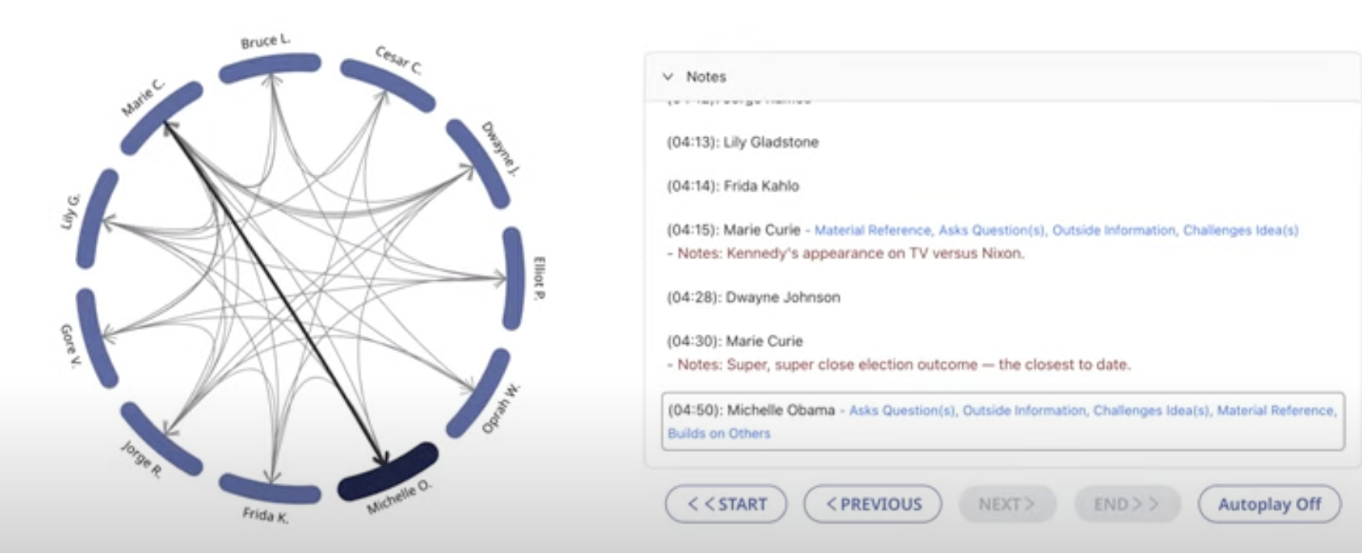
Note: The circle tracks the sequence and flow of conversation when the teacher taps the name of the student speaking. The right side consists of running notes of the conversation, where the teacher can note the type of comment made and type any other notes.
Dialogic can do more than just track the discussion. After the discussion has concluded, it can provide data for each participant (Figure 3), track participation by gender or race/ethnicity (which is important to ensure discussion equity), provide insight through identifying trends and comparing data across discussions (Figure 4), and generate (and email) individual or whole class rubrics to students to provide feedback.
Figure 3
Individual Post-Discussion Data Post
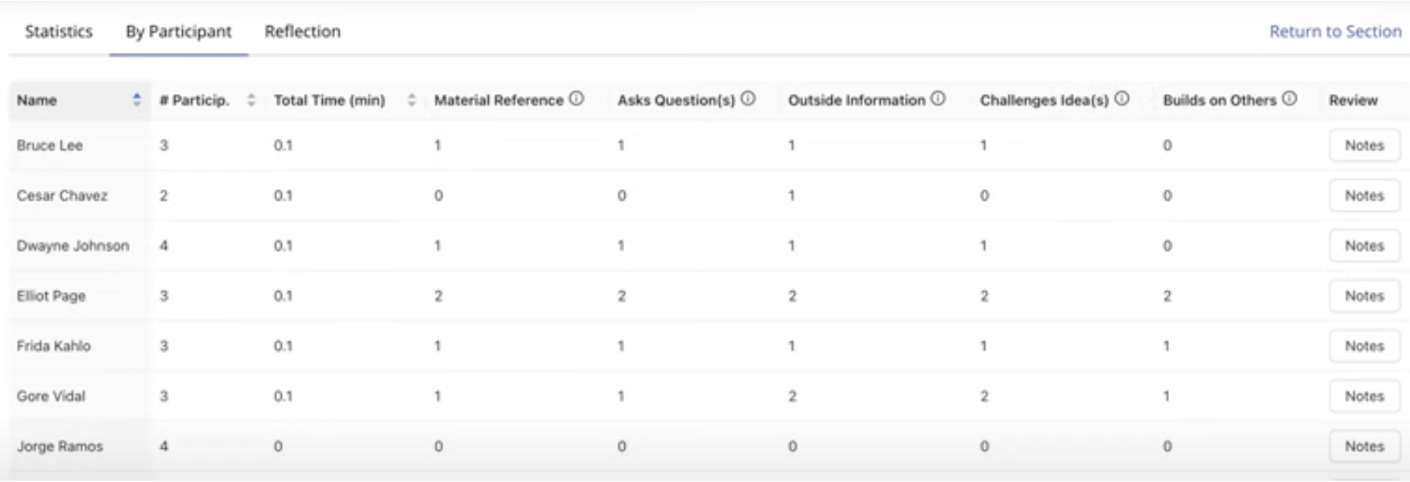
Note: The data above shows an example of the number of times each student participated, the total “air-time” used by each student, and the frequency of the comment type (question, using evidence, building on another student’s point, etc.)
Figure 4
Insights Across Multiple Discussions
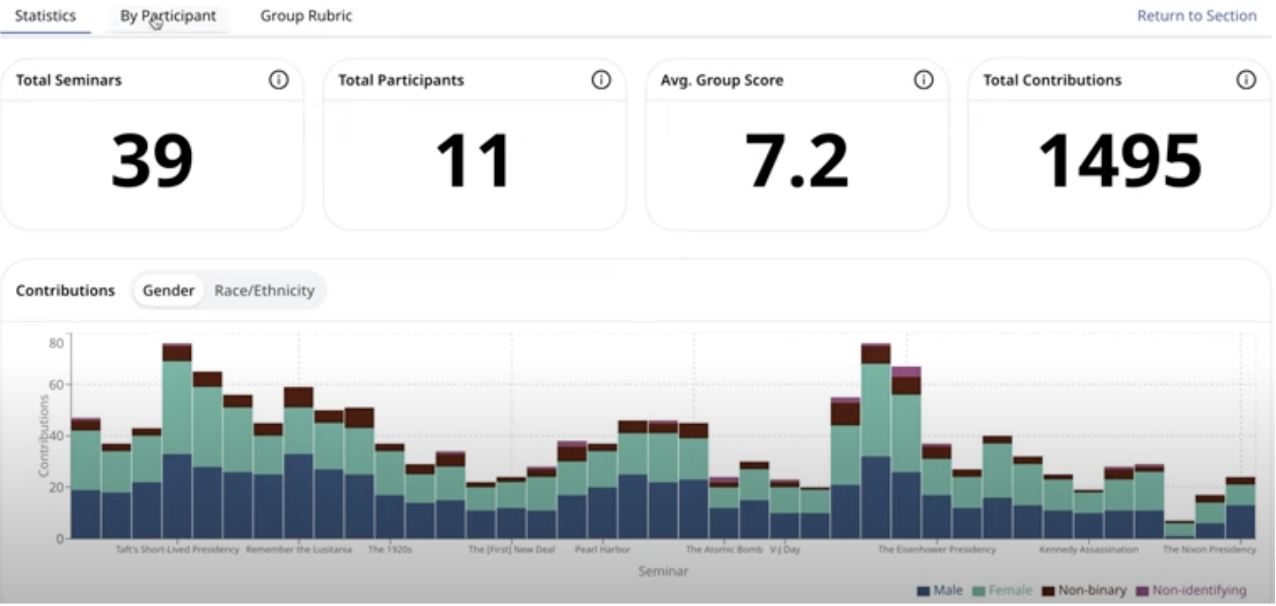
Note: This figure demonstrates trends across 39 discussions (listed as “seminars”). Though there are multiple tabs to analyze data across discussion, this tab depicts the equity of discussion based on gender. This can allow educators to see if, over the course of many discussions, conversations are being dominated by students of a particular demographic. Other tabs allow the educator to see the fluctuations in student discussion scores.
Implementation of Dialogic in Practice
Let me discuss my World History I class as an example of how I have used this tool. My students engaged in a whole-class discussion regarding the Crusades, and I wanted to give each student individual feedback on their discussion performance. I created my class and inputted my students (along with their emails) into Dialogic. During the discussion, I used Dialogic to make brief notes and indicated the type of comment each student made during the discussion. Once the discussion was completed, I used the “insight” feature to provide feedback based on the rubric. The rubric I used required students to be regular participants in the discussion—without dominating it—cite text, refer to other students’ comments, and actively listen through behaviors such as eye contact, sitting up, and putting their devices away. Then, after I graded students on the rubric, I clicked the “Email PDF” button to automatically send that completed rubric as a PDF to my students (Figure 5) .This is just one of the many ways this tool can be used.
Figure 5
Example of Individual Feedback Form
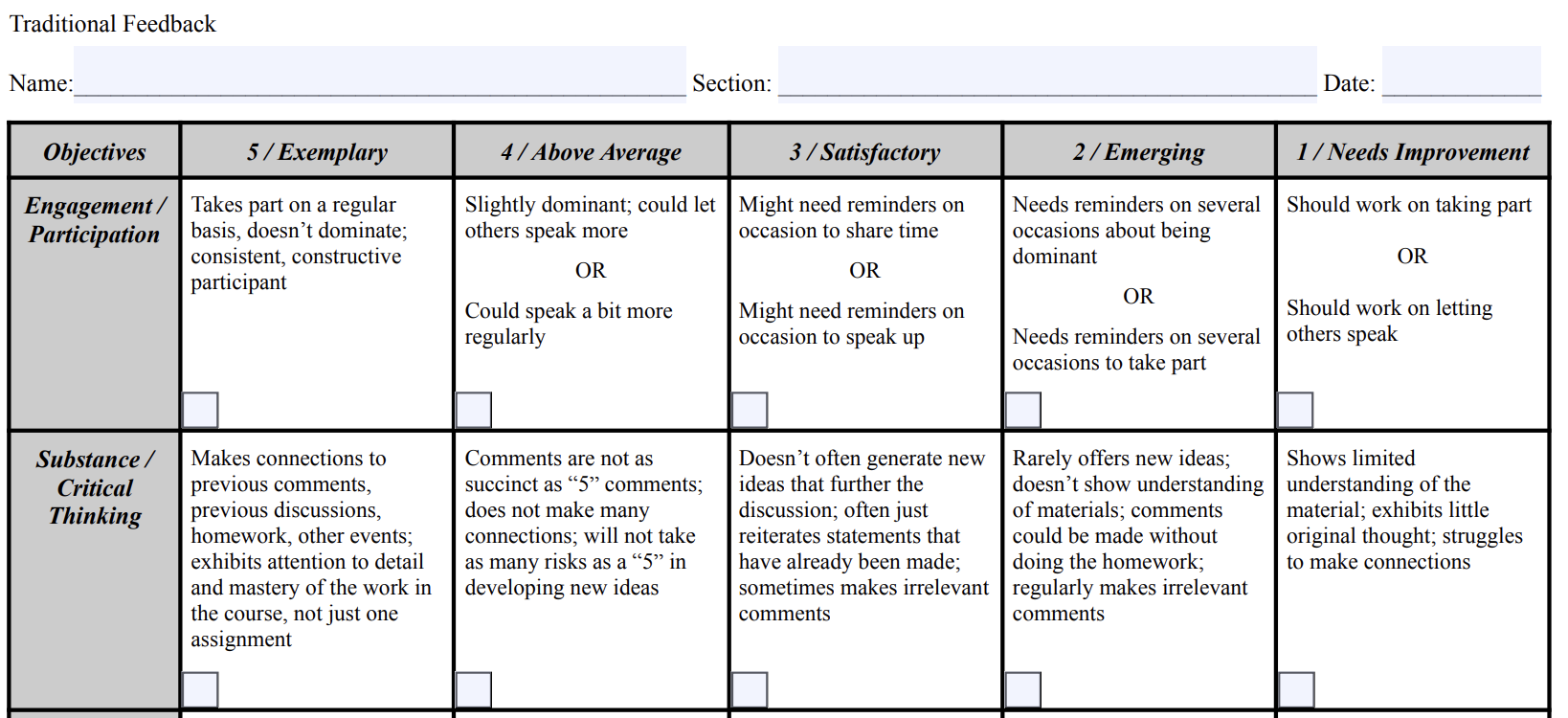
Note: This function helps to keep feedback timely, private, and helpful.
One of the largest challenges I faced in my World History I class was ensuring that the discussion was equitable and that all students were participating in a substantial and meaningful way. Prior to using Dialogic, there were a handful of male students who dominated the discussion; however, it was difficult to know or show the extent to which that domination affected the discussion. Dialogic gave me the ability to show students the results. After one tracked discussion on Dialogic, I provided the graphical depiction of the conversation, which visually showed the flow—or lack thereof—of conversation (Figure 6).
Figure 6
Conversation Map After Reflection
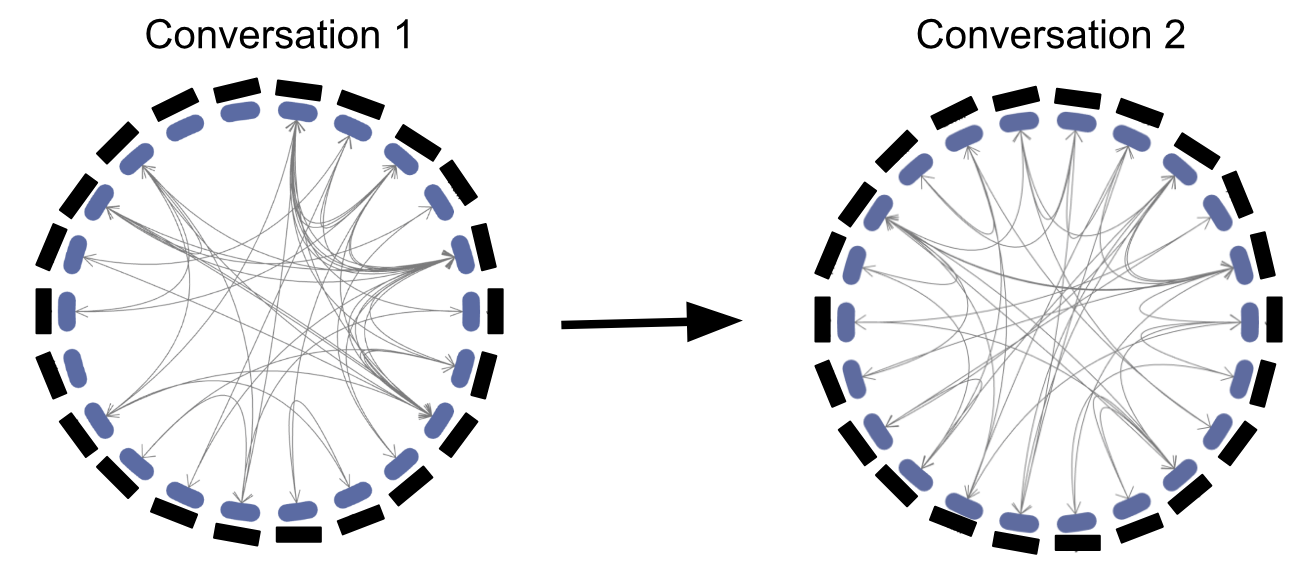
The conversation map on the left demonstrates the flow of conversation in my World History I class. There are numerous students who did not participate, and a few who dominated the conversation, as represented by the lines. After showing students the image and asking them to reflect and generate strategies for their next conversation, the students participated in another discussion, depicted in the circle on the right.
I also showed students their individual data and simply asked students to: (1) look at their data on the chart and the group map, (2) chat with a partner about their individual performance during the discussion, and (3) note and submit two things they can do to ensure a higher quality discussion next time. Prior to the next conversation, I had students view what they had submitted. Some examples of student submissions included:
Student A: “There were still a few people who didn’t get a chance to speak, so perhaps it would be a good idea for me to invite those who didn’t speak yet.”
Student B: “At times discussion strayed away from the text, I need to reference the text next time.”
Student C: “I feel like the conversation may have moved a bit too fast. I think I can try to mention that to the group next time to help the pace so that others can jump in.”
Dialogic made this growth possible, and I would encourage educators to consider the ways in which this tool could foster higher-quality discussions in their own classrooms.
This short reflection, along with the data captured by Dialogic, resulted in growth in discussion quality. Students who dominated the discussion the first time took a step back, while students who had barely participated joined more frequently, and there were more invitations from students to get others involved in the conversation. Dialogic made this growth possible, and I would encourage educators to consider the ways in which this tool could foster higher-quality discussions in their own classrooms.
Next Steps
One factor that many educators may be concerned about is privacy. In the polarized political stage that our country has entered, school boards, parents, and others have become more interested in what happens in our classrooms. I was worried about how data was stored and shared. Josh assured me that he is “super vigilant about protecting the privacy and confidentiality of users,” and that he “took care to create a privacy policy and terms of use that clearly state [that he does not] oversee any data that would be invasive or breach the confidentiality of students or teachers” (J. Mishrikey, personal communication, October 3, 2024). He also addresses how data is stored in the Dialogic FAQ.
Since our discussion, Dialogic has rolled out even more features for educators. For instance, Josh stated that he is implementing an automatic transcription tool, saying that he wants “teachers [to be] present with their students and be human with them” (J. Mishrikey, personal communication, October 3, 2024). Having an automated transcript of discussions would free educators from the need to type detailed notes, and allow for a more authentic conversation.
Before I closed my discussion with Josh, I asked him if there was anything he felt was important to add. He made it clear that he simply wants “classrooms to be fruitful, dynamic places of academic and intellectual energy,” and for educators to use Dialogic only if it helps that mission. Josh closed with, “If [educators] actually prefer a no-tech or low-tech experience, all power to them” (J. Mishrikey, personal communication, October 3, 2024).
Conclusion
What became clear to me in my conversation with Josh was his authentic commitment to helping public school teachers. Through using this tool, I have been able to help students reflect on their discussions. I have been able to send all students individualized feedback via email to ensure feedback is prompt and private while also providing class-wide feedback by reviewing trends over multiple discussions. These changes have resulted in more equitable and higher quality discussions within my classes.
Most importantly, though, is that my students are growing their skills of discussion together in a systematic, measurable way that doesn’t take the human out of humanities. The discussions remain natural and organic, and my tracking doesn’t feel like a cumbersome roadblock to the conversations. Moreover, students are learning what it means to discuss, how to be a contributing community member, and how to explore ideas that may not align with their own.
Discussions for understanding promote empathy. At a time where a debate without insults is seen as abnormal, educators should push back on the cultural rhetoric by demonstrating how discussions can look within their classrooms. I hope educators can benefit from having tools like Dialogic to help foster the empathy that comes from genuine discussion.
1I am in no way affiliated with Dialogic, but it has been an extremely useful tool that other educators may benefit from using.
Citation
Lancaster, J.. (2026). Dialogic: A tool to facilitate discussion. Kaleidoscope: Educator Voices and Perspectives, 12(2), https://knowlesteachers.org/resource/dialogic-a-tool-to-facilitate-discussion.